Official game
Play I Know a Spot
This game is hosted by Steam. Continue to the official page to play or download it.
Buy on SteamOverview
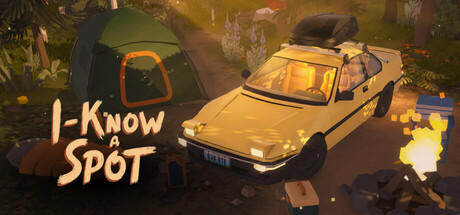
I Know a Spot is a cozy sandbox building game about driving to scenic locations, setting up beautiful campsites, and relaxing with your dog. No enemies, no timers, no fail states, no objectives. The entire point is atmosphere, creativity, and peaceful moments in nature.
Developer: Bohdan Kvas — solo developer, self-published.
Release Date: July 14, 2026
Price: $7.99 USD (launched at $6.79 with 15% discount)
Platforms: Windows 10/11 (64-bit) and macOS (Apple Silicon native via Unity URP)
Demo: Free demo available — includes the first area and a subset of items.
Engine: Unity URP (Universal Render Pipeline).
What Makes It Different
The cozy-game genre is crowded, but I Know a Spot carves out a distinct niche:
- Vehicle customization is a real system. Multiple car models, full color picker (matte/gloss), wheels, roof racks, decals, and interior trinkets. Your car becomes part of the campsite composition, not just transport.
- The dog is the emotional anchor. No pet-sim stats — just a dog that walks around, sits by the fire, explores, and exists alongside you. Every camp feels lived-in.
- Seasonal, varied environments. Forests, lakes, mountains, and seasonal locations with different lighting angles, foliage, and color palettes.
- No grind, no gates. Most items are accessible from the start. No progression locking.
- Runs on anything. GTX 750 and 4 GB RAM minimum. Integrated graphics supported.
Steam Tags: Casual, Cozy, Building, Relaxing, Sandbox, Cute, 3D.
Accessibility: Playable without Timed Input, Save Anytime, Family Sharing.
Getting Started
Step 1: Try the Demo
The free demo gives you the first location and a curated item subset. Spend 20–30 minutes. If the loop clicks, the full game delivers the same quality across more cars, locations, and decorations.
Step 2: Choose Your First Car
The starting garage offers a compact hatchback, midsize sedan, and SUV-style vehicle. Stats don't matter — pick what looks good. Customize paint (full color picker, matte/gloss), wheels, accessories (roof racks, lights, decals), and interior trinkets. You can switch cars anytime.
Step 3: Drive to the First Spot
The first marked location is typically a Lakeside Clearing. Follow the road at a relaxed pace. Driving is simple — no racing, no damage, no traffic. You're in third-person following the car through forest roads.
Step 4: Unpack and Build
Press E to unpack your gear. The building system is freeform:
- Select an item from the inventory bar
- Position with mouse — items snap to terrain surface
- Click to place; rotate with scroll wheel or Q/E
- Items can be repositioned or picked up after placement
Start with tent, campfire, and a chair. Then layer in lanterns, tables, rugs, decor.
Step 5: Meet Your Dog
The dog waits near the car. Interact (E) to call them. They'll explore autonomously — sniffing, sitting by objects, following at a distance. No command system — the autonomy is the charm.
First 30 Minutes Checklist
| Priority | Action | Why |
|---|---|---|
| 1 | Walk the entire location before building | Find best view, flattest ground, best light |
| 2 | Place tent off-center | Symmetry looks unnatural in nature |
| 3 | Build fire and seating zone | Creates the camp's focal point |
| 4 | Add 2–3 lanterns | Transforms the scene at night |
| 5 | Park car as background element | Not the centerpiece — part of the composition |
| 6 | Don't place everything | Sparse, intentional campsites look better |
Controls Quick Reference
| Action | Key |
|---|---|
| Unpack gear | E (near car) |
| Place item | Left-click after selecting |
| Rotate item | Q / E or scroll wheel |
| Pick up / move item | Click placed item |
| Interact with dog | E (near dog) |
| Hide UI (screenshot) | Toggle in settings |
3. Vehicle Customization: Complete Guide
Your car is both transport and a design element. The customization system has surprising depth.
Available Categories
Body/Model: Multiple styles — compact hatchback, sedan, SUV. Each silhouette changes the visual weight of your campsite.
Paint: Full RGB color picker with matte/gloss finishes. Matte absorbs light (good for forests). Gloss reflects highlights (pops against water or snow).
Wheels: Several rim designs in different sizes. Larger wheels = aggressive stance; smaller = utilitarian.
Accessories: Roof racks, auxiliary lights (visible at night), decals, small visual mods.
Interior: Dashboard trinkets, seat colors. Visible through windshield in close-up shots.
Matching Cars to Locations
- Forest (Pine Ridge, Autumn Grove): Earth tones, matte finish, roof rack. Blend, don't compete.
- Lakeside: Bright colors (teal, yellow, white), gloss finish. Water reflection doubles visual impact.
- Mountain: Dark, muted colors. Car silhouettes against sky and rock.
- Night builds: Light-colored cars catch fire glow. Dark cars disappear into shadow.
Player Wishlist
Reviewers want more car models (one specifically requested a Mercedes W124-style vehicle) and even deeper customization. The developer hasn't confirmed additional models yet but has promised free content updates.
Advanced Tips
Complete Item Categories
Shelter: Small tent, large tent, A-frame tent, tarps/canopies, hammock.
Seating: Folding camp chairs, wooden benches, log seats, floor cushions.
Lighting: Campfire (wide area, dynamic flame), lanterns (focused warm pools), string lights (ambient ceiling between trees), candles (subtle table detail), torches.
Cooking & Food: Camp stove, portable grill, cooler, table settings, 25+ food items — fruits, snacks, drinks, cooked items, camping staples.
Decor: Rugs, potted plants, signs, flags, pillows, blankets, books, small props.
Storage: Wooden crates (stackable), canvas bags, storage boxes.
Placement Mechanics
Freeform — no grid, no snap (except to terrain). Rotate before confirming, reposition after placing, place items on elevated surfaces (tables, crates). No item limit, but restraint wins: 8–12 well-placed items beat 30 scattered ones.
Zone Design
- Sleeping Zone: Tent + rug + lantern + side table. Tucked away from fire.
- Cooking Zone: Stove/grill + cooler + prep table + food. Near the car.
- Social Zone: Campfire + seating arc + string lights overhead. Visual center.
- Viewing Zone: Chair(s) facing the landscape. Camp edge.
- Entry Zone: Car + bags + crates. The "just arrived" story element.
Common Mistakes
| Mistake | Fix |
|---|---|
| Everything in a straight line | Triangular or L-shaped layouts |
| Tent dead center | Offset tent; fire as center |
| No negative space | Leave breathing room between zones |
| Ignoring the view | Face seating toward landscape |
| Too many lanterns | 2–3 well-placed lights beat 10 scattered |
5. The Dog Companion
The dog is the game's secret weapon. No hunger bars, training, or stats — it simply exists, and that presence transforms every campsite from diorama to living space.
Behavior Patterns
- Explores camp perimeter — sniffing at objects and terrain
- Sits by campfire at night — the most photographed moment in the game
- Follows at a distance when you move
- Reacts to petting/calling with brief animations
- Investigates new objects you place
- Naps in sunny spots during daytime
Screenshot Tips
You can't pose the dog, but you can influence it:
- Build camp first, then call the dog — they'll explore the finished scene
- Light the campfire near sunset — the dog almost always sits beside it
- Place a rug near the fire — the dog may lie on it
- Wait 10–15 seconds after interactions — the dog settles naturally
Why It Works
Reviewers consistently mention the dog. The absence of pet-care mechanics is intentional — the dog isn't a responsibility, it's a companion. In a game with no objectives, the dog gives you something alive to watch, something that makes empty camp feel inhabited. The dog is invincible — nothing in the game can harm it.
6. Location Guide & Environmental Strategy
Each location is a self-contained area with unique terrain, lighting, and mood. Layouts save separately — build at all five and return anytime.
| Location | Terrain | Best Light | Vibe |
|---|---|---|---|
| Lakeside Clearing | Flat, open water | Sunrise, golden hour | Classic camping, wide vistas |
| Pine Ridge | Forest canopy, slopes | Midday dappled, dusk | Secluded woodland, hammock-friendly |
| Mountain Pass | High altitude, rocky | Sunset, night stars | Dramatic stargazing |
| Riverside Bend | Flowing water, shade | Afternoon, overcast | Relaxed, gentle |
| Autumn Grove | Dense trees, fall colors | Late afternoon, firelight | Cozy warm-toned evening |
Location Strategies
Lakeside Clearing: Face chairs toward water, not camp. Water reflection doubles lantern/string-light impact. Cool morning light — warm lanterns create beautiful contrast.
Pine Ridge: Forest canopy frames scenes naturally. Drape string lights between two trees. Build on flattest patch; use rugs to level visual zones. Hammocks work best here.
Mountain Pass: Build compact and intimate — sprawling layouts get lost against the scale. Minimal artificial light during golden hour. Campfire against starfield is the signature shot.
Riverside Bend: Position seating near enough to hear the water. Shade creates soft shadows — good for afternoon sessions. Overcast weather here is uniquely moody.
Autumn Grove: Warmest palette. Firelight feels especially cozy against orange/red foliage. Build tight — dense trees limit open ground. Best location for evening-only builds.
Day-Night & Weather
- Dawn (4:30–7 AM): Cool blues, long shadows, possible mist. Atmospheric shots.
- Midday (11 AM–2 PM): Harsh overhead light. Build under tree cover.
- Golden Hour (5:30–7:30 PM): Warm directional light. Best screenshot time.
- Night (8 PM–4 AM): Artificial light defines the scene completely.
- Weather: Post-processing and weather effects confirmed in recommended specs. Overcast, clear, and variable conditions.
7. Advanced Design & Photography
Lighting Composition
Campfire Placement:
- Center: Maximum visibility, classic social camp
- Offset: Pools of light and shadow — more dramatic and photographic
- Near tent: Intimate, personal — fire as bedside lamp
- Two fires (advanced): Social zone + sleeping zone for depth
Lantern Strategy:
- Triangle: Three lanterns around seating area — overlapping warm pools, no harsh shadows
- Path lighting: 2–3 lanterns from car to tent tells a visual story
- Table detail: Single candle on a table rewards returning at night
String Lights: Drape between trees or tent-to-tree for a "ceiling" effect. At night they produce soft ambient glow that photographs beautifully.
Framing Principles
Think in foreground, midground, background:
- Foreground: Chair, rug edge, low lantern — creates depth
- Midground: Fire, tent, seating — main subject
- Background: Landscape, car, sky
Rules that work in-game: Rule of thirds (offset tent/fire), leading lines (shoreline, lantern paths), natural frames (trees, rock formations, car silhouette), negative space (empty grass and open sky make camp feel spacious).
Screenshot Tips
No photo mode, but Hide UI toggle exists:
- Wait for golden hour or blue hour
- Hide UI
- Camera low (near ground level) for cinematic angles
- Include the dog — fire trick works every time
- Frame through foreground (trees, tent flap, car window)
- Capture same camp at three times of day for triptychs
Seasonal Color Strategy
- Cool-toned (Lakeside, Mountain): Warm lanterns/fire against cold blue backdrop = striking contrast
- Warm-toned (Autumn Grove): Candles over lanterns. Smaller fire. Let environment do the lighting
- Overcast: Build intimate, tight clusters. Bright items (tents, chairs) pop against muted light
8. Performance, Settings & Technical
System Requirements
Minimum (Windows): Windows 10 64-bit, Intel i3-6100 / AMD FX-6300, 4 GB RAM, Intel HD 530 / GTX 750 / R7 260, DirectX 11, 2 GB storage. Designed for low-end hardware.
Recommended (Windows): Windows 10/11 64-bit, Intel i5-8400 / Ryzen 3 1200, 8 GB RAM, GTX 1050 Ti / RX 560, DirectX 11, 2 GB storage. 1080p with post-processing and weather effects.
macOS (Minimum): macOS 12 Monterey, Apple M1 or Intel i5 Dual-Core, 4 GB RAM, integrated Apple GPU / Intel Iris Plus.
macOS (Recommended): macOS 13+, Apple M1/M2/M3, 8 GB RAM. Best on Apple Silicon.
Linux: Not supported.
Performance Notes
Unity URP keeps the 2 GB install tiny and performance solid on low-end hardware. July 15, 2026 patch (day after launch) added game settings and performance optimization — active developer support.
Graphics Settings (Inferred)
Based on the patch notes: resolution/window mode, quality presets, post-processing toggle, weather effects toggle, UI hide toggle.
Steam Deck
No official verification yet. Runs, but UI may be small on the 7-inch screen. Low requirements and Unity URP make it a strong Deck candidate — expect community settings guides as player base grows.
Known Issues
From reviewer feedback:
- Controls can be confusing initially. One 27-hour reviewer struggled with controls.
- Car movement restricted. Can't freely reposition car on some maps after arriving — limits framing.
- Not a driving game. No first-person driving or free open-world exploration. Car follows roads between designated spots.
- No co-op/multiplayer. Single-player only.
- Small UI on Steam Deck. Not yet optimized for the Deck screen.
9. Community & Developer Roadmap
Review Summary
5 user reviews (all positive) as of August 2026. Key themes:
What Players Love:
- Atmosphere and environmental detail
- Relaxing, no-pressure design — "perfect for slowing down"
- Car customization depth — "every car can feel unique"
- Surprising content depth (25+ food items, multiple locations)
- Dog companion as emotional anchor
What Players Want:
- First-person view — the most-requested feature
- Actual driving mechanics (getting in the car, free driving)
- More open world — building anywhere, not just designated spots
- Deeper car customization and more models
- More locations and better control onboarding
Developer Activity
Bohdan Kvas has been responsive:
- July 14, 2026: Launch at $7.99 ($6.79 launch discount)
- July 15, 2026: First patch — performance optimization + game settings
- Developer has posted about free updates for more locations, items, and possibly cars
- No paid DLC planned
- Support: [email protected]
Solo developer pace will be measured, but the day-one patch and clear communication are positive signs.
Similar Games (Steam "More Like This")
- Paralives ($34.00) — Life sim with deep building
- Two Point Museum ($34.90) — Management with creative placement
- Heartopia (Free to Play) — Cozy world-building
- Hozy ($13.99) — Cozy exploration
At $7.99, I Know a Spot is the budget option with a focused, polished scope.
10. FAQ & Final Verdict
FAQ
Multiplayer/co-op? No. Single-player only. Family Sharing supported.
Build anywhere? No — designated campsite locations only. No roadside or random forest building.
Actually drive the car? Partially — third-person chase view between locations. No first-person driving or free open-world exploration.
Dog die or get hurt? No. Invincible. No dangers in the game.
How many cars? Switch freely between all unlocked cars. No garage limit or cost.
Photo mode? No dedicated mode, but Hide UI toggle exists for clean screenshots.
Save multiple camps? Yes. Each location's layout saves independently. Return anytime.
Mod support? None announced. Solo-developed Unity game — unofficial modding possible but unsupported.
Steam Deck? Not verified. Runs but UI may be small. Strong candidate for future verification.
More content coming? Developer has posted about free updates: more locations, items, possibly cars. No paid DLC.
Early Access? No — full release on July 14, 2026. Content updates are post-launch additions.
Languages? English only.
Who Should Buy
Buy if you:
- Want zero-stress creative sandbox with no timers, enemies, or fail states
- Love camping aesthetics, nature scenery, cozy atmosphere
- Enjoy building/decorating without grind or progression gates
- Appreciate vehicle customization as creative outlet
- Want a relaxation tool — 20 minutes to unwind
- Have low-end hardware or Mac and value good performance
Skip if you:
- Need objectives, quests, progression systems
- Want open-world driving or first-person vehicle gameplay
- Expect multiplayer/co-op
- Need deep mechanical systems or challenge
- Want hundreds of hours of content — this is focused, not endless
Value Assessment
At $7.99, I Know a Spot is priced below most cozy/building games. The free demo lets you evaluate risk-free. Playtime estimates:
- Demo: 30–60 minutes
- Build every location once: 3–5 hours
- Build, rebuild, photograph, experiment: 10–20+ hours
- Reviewer playtimes: 8, 18, and 27 hours at time of review
Final Word
I Know a Spot is a focused, honest game — a campfire simulator, car photography tool, and dog-hangout sandbox. The solo developer built something that knows exactly what it is and doesn't pretend otherwise. If the demo clicks — if you find yourself adjusting a lantern for the fifth time because the light isn't quite right, or waiting for sunset just to see the glow against the tent — $7.99 is a steal. If you need objectives to stay engaged, it's not your game.
It's a spot to breathe, not a mountain to climb.
Guide compiled from Steam store page, Steam API, user reviews, community discussions, and developer patch notes. Last updated: August 2026. Editorial content by gamehowto.com.
Screenshots